How to Get the Best Results from AIpraisal: A Complete Guide
A current appraiser workflow for item photos, AI-assisted details, comparable research, Focus Search, source review, evidence selection, and exports.
Direct Answer#
Use AIpraisal as a controlled research workflow: start with a clear item photo and known description, run the item analysis, correct the generated details, refine the comparable query, and verify each source before selecting evidence. Use Focus Search or Re-analyze when the subject information changes, and add a manual comparable when your own verified source is not in the research results. AIpraisal organizes the work; the appraiser decides which evidence is relevant and what conclusion it supports.
Key Takeaways#
- Review and correct AI-assisted item details before relying on them to guide comparable research.
- Open the underlying source, assess relevance, and select evidence based on the assignment rather than a result's rank or visual resemblance.
- Use the current Focus Search, Re-analyze, manual-comparable, evidence-note, and report-export controls to document the appraiser's own research decisions.
The Current Workflow#
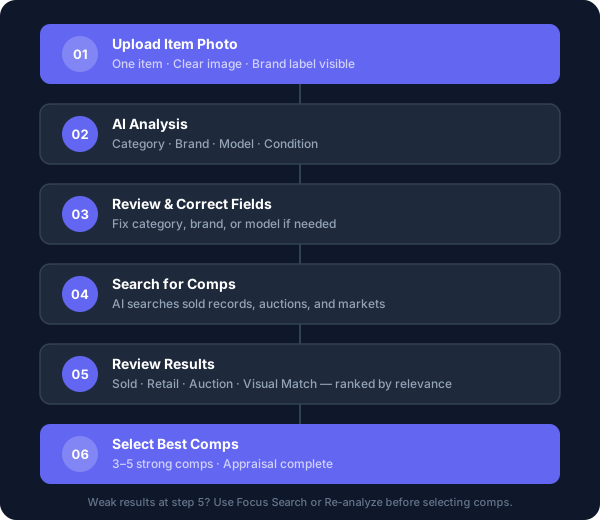
The item workspace separates the work into Analysis, Research, Evidence, and Notes. A practical sequence is:
- Add the item photo or description and choose Analyze Item.
- Review the generated item identity and editable details.
- Open Research, revise the search query if needed, and choose Search.
- Use Focus Search when only part of the image should guide the next action.
- Open candidate sources and decide which evidence to select.
- Add outside evidence through Manual comp when necessary.
- Record report-facing and source-suitability notes.
- Review the project report and export the issued PDF when the appraisal is ready.
Each step gives the appraiser a checkpoint. Do not treat an automated field, candidate result, or generated report section as accepted merely because it appears in the workspace.
1. Start With a Clear Subject Record#
Use a photo that shows the item you intend to analyze. Keep the subject visible, avoid covering material features, and add close views of marks, labels, damage, repairs, or model information when they matter to the assignment.
Add a known description when the photograph cannot communicate a relevant fact. Distinguish what the user supplied from what the software generated, and do not present an unverified statement as an observed fact.

2. Analyze, Then Verify the Item Details#
Choose Analyze Item after the image or description is ready. The Analysis workspace can organize fields such as:
- item name and generated description;
- category, style, and material;
- species or grade where relevant;
- brand, model number, and maker;
- dimensions, quality, origin, and age or period;
- provenance, alterations, restorations, and obsolescence; and
- condition, quantity, unit, and valuation approach.
These are editable research inputs. Compare them with the photograph, inspection information, client records, maker documentation, and other evidence available for the assignment. Correct a field when the support points elsewhere, and leave an uncertain fact qualified rather than turning it into a definitive description.
The Re-analyze control is available after analysis. Use it when a corrected identity or material subject detail should produce a new analysis. A minor editorial change does not necessarily require re-analysis.
3. Control the Comparable Query#
The Research workspace shows a search-query field and, when available, suggested queries. You can select a suggestion, edit it, or enter a different query before choosing Search.
Build the query from verified distinguishing facts:
- maker, brand, model, or pattern;
- object type and material;
- dimensions or capacity;
- age or period;
- quantity or set composition; and
- another characteristic that separates the subject from common alternatives.
Avoid adding an attribution or condition claim merely to narrow results. A more specific query is useful only when its facts are supportable.
4. Use Focus Search Deliberately#
Focus Search lets you draw a box around an area of the item image. After a selection, the current controls offer:
- Search Only, which runs a visual search from the selected area.
- Update & Search for an analyzed item, which re-analyzes the selection before searching.
- Analyze & Search when the item does not yet have analysis.
- New Item (Cropped) or New Item (Full) when the image represents an additional item that should have its own record.
Use the selection to isolate the subject from surrounding objects, examine a component, or separate two items shown in one image. Confirm that the selected area still contains enough information for the action you choose.
5. Review Candidate Sources#
A research result is a candidate, not selected evidence. Open the available source and check:
- whether the price is a completed sale, asking price, estimate, or another figure;
- whether the sale date, venue, currency, and material terms are available;
- whether the title and image describe the same property;
- whether condition, size, quality, maker, age, provenance, and quantity are comparable;
- whether the market and date fit the assignment; and
- whether an unusual price or missing fact limits reliance.
For a charitable-contribution assignment, the IRS fair-market-value guidance requires consideration of all relevant facts and circumstances. A current listing is not automatically evidence of a completed transaction, and no result type should be selected without source review.
6. Select and Explain Evidence#
Select the candidates the appraiser determines are relevant. The Evidence workspace supports more than one selected comparable, a primary comparable, an appraised-value field, and notes about selection and source suitability.
The number of selected sources should follow the needs of the assignment. Explain material differences and weighting rather than treating a larger set as inherently stronger. Reject or leave unselected a candidate that is not credible or comparable, even when it appears near the top of the results.
Use report-facing notes for concise assignment-specific explanation, such as a condition difference, market limitation, or reason a source received particular weight.
7. Add a Verified Manual Comparable#
Choose Manual comp when you have relevant evidence that is not available in the research results. The current form records:
- a title or description;
- a sale price;
- an optional listing URL; and
- an optional image.
The saved entry becomes selected evidence. Verify the source before entering it and retain enough information for the workfile to explain what the price represents. “Manual” does not mean exempt from source review.
8. Review the Report and Export#
Selected item details, evidence, value conclusions, and report-facing notes can feed the project's report workflow. Before issuing a report:
- confirm the subject information and intended use;
- review every selected source and related note;
- confirm that value conclusions reflect the appraiser's analysis;
- resolve report-readiness items and required disclosures; and
- inspect the final report packet before issuing it.
The issued-report page provides an in-app PDF view and a Download PDF control. The export preserves the report output; it does not replace the appraiser's final review or responsibility.
A Repeatable Quality-Control Checklist#
- The item image and description identify the intended subject.
- Generated details were checked against available evidence.
- The search query contains supported facts.
- Focus Search or Re-analyze was used only when a changed subject input justified it.
- Every selected comparable was opened and assessed at its source.
- Manual evidence includes enough information to verify what it represents.
- Selection, suitability, and adjustment reasoning is recorded where material.
- The final report and exported PDF match the appraiser's conclusions.
AIpraisal helps organize this workflow. It does not authenticate property, choose the relevant evidence, or determine a value conclusion for the appraiser. For a broader overview, visit personal property appraisal software.
Related reading
How appraisers can use AI to organize item details and candidate comparables while retaining responsibility for verification, relevance, and value conclusions.
AIpraisal
Ready to streamline your appraisal workflow?
Start your 30-day trial to organize item details, comparable evidence, and appraisal documentation in one workflow.
Start your 30-day trial